When it is the first card order for all employees or when you are ordering a card for a new employee.
The cards are valid for 2 years from the date of the card order.
Please take into account our current price list when ordering the card: https://edenred.fi/en/employer/price-list
- Log in to the Ordering tool.
-
If you manage multiple companies, select the company for which you want to make the order.
-
Choose the benefit from the 'Product selection' for which you intend to order cards. Please note that if your company has multiple employee benefits, you will need to order separate cards for each benefit.
- Ordering cards for all employees:
- You can fill out the 'Order via Excel', which you can also use for future orders.
- Alternatively, you can allow employees to enter their own information through the 'Employee Orders' tab.
If you are ordering a card for a new employee:
- Click on 'Order via online form' -> 'Card order' -> 'New card order'.
-
Remember to click 'Submit/Ready' at the end to send the order through.
Order a replacement card, when an employee has lost their card or it is defective, or the employee has changed their name.
The cards are valid for 2 years from the date of the card order.
Please take into account our current price list when ordering the card: https://edenred.fi/en/employer/price-list
If you want to renew the card in the middle of its validity period, you can order a replacement card from the 'Employee management' tab. (See images below.)
- Go to 'Employee management'.
- Select 'Employees'.
- Find the person's details.
- Click Edit (pencil icon).
- Check the details.
- Click 'Re-issue'.
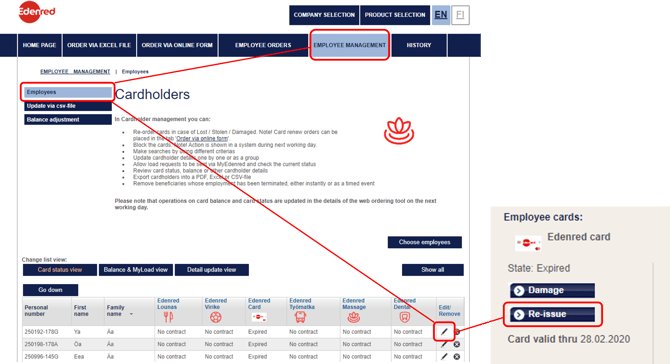
This is how you renew the employees' cards
The cards are valid for 2 years from the date of the card order.
Please take into account our current price list when ordering the card: https://edenred.fi/en/employer/price-list
- Log in to the Ordering tool.
- Select the company for which you want to place an order (if you manage multiple companies).
- Choose the Edenred card: Lounari/Virike benefit from the 'Product selection' (with the image of the physical card).
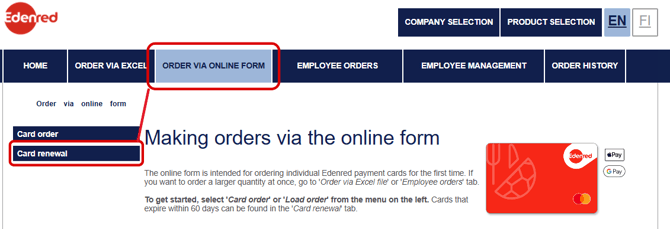
- Renew the expiring physical card from the 'Card renewal' section under the 'Order via online form' tab (see the image below).
Note: Virtual cards are automatically renewed 15 days before expiration. The new virtual cards' activation serial numbers will be sent to the employees by email.