
In this case, you will need to terminate the employment relationship associated with the wrong personal identification number. After that please add the employee again to the system with the correct personal identification number.
Terminating employment in the Ordering tool
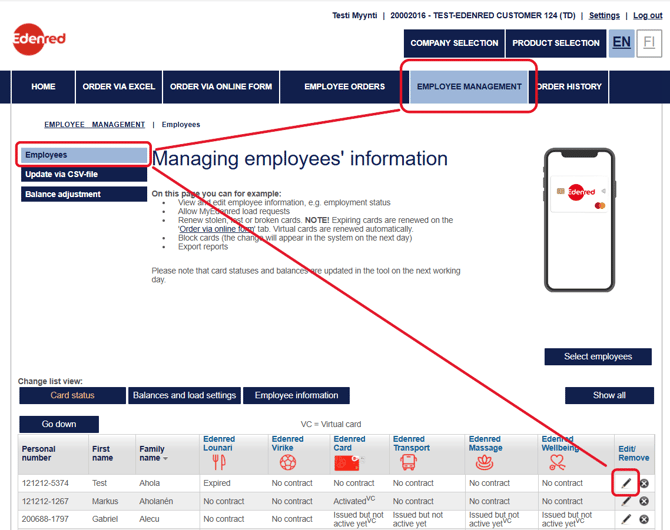
- Go to the 'Employee Management' section from the top menu.
- Find the desired person in the 'Employees' list and start editing by clicking on the pencil icon.
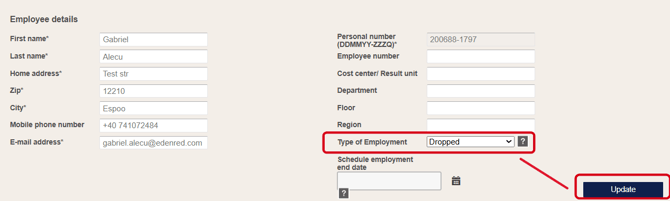
- Set the employee to 'Dropped' status by selecting 'Type of Employment'.
- Save the settings by selecting 'Update'. Please note that the change cannot be undone after saving.
Please inform the employee that he/she will receive an email notification regarding the termination of their employment, which they can disregard.
Ordering a new card/cards
Order a card from the Ordering Tool as follows:
-
Click 'Card product'
-
Choose Online Order Form or Excel Order Form
-
Click 'Card Order'
If your company uses a physical Edenred card, instruct the employee as follows:
The employee can opt to activate the card for virtual use before the physical card arrives.
The individual can obtain the serial number of the new ordered card by calling our customer service at 09 7594 2848. The serial number will be available starting from the next business day after the card order. The card can be activated in the Edenred app using the serial number.
Make a balance adjustment request, if balance has been loaded to the wrong personal identification number
If a balance has been ordered under the wrong personal identification number for multiple different benefits, a balance adjustment request must be made for each loading. The cost of the balance adjustment is 15 € + VAT per adjustment for each balance loading.
-
Select the benefit from the 'Product Selection'.
-
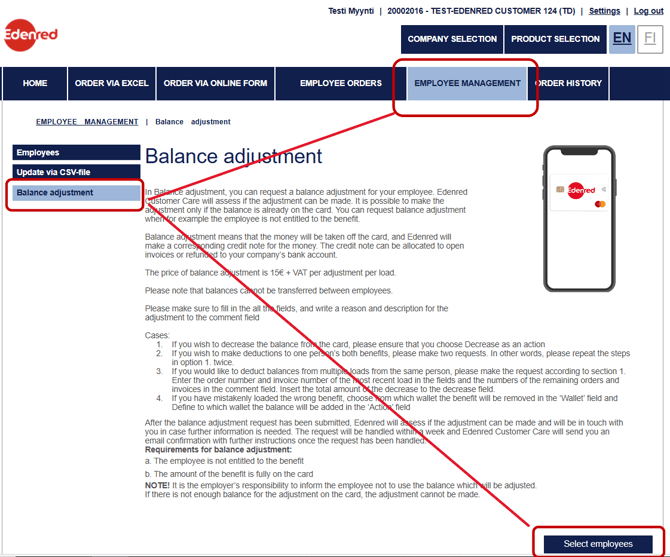
Navigate to the 'Employee Management' section from the top menu.
-
Select 'Balance Adjustment' from the left-hand menu.
- In the 'Select employees' section, choose the employee associated with the wrong personal identification number.
We can issue a credit invoice or refund the money, for the incorrectly loaded balance, to your company's account upon receiving the balance adjustment request. You can use the credit invoice for your future invoice(s).
The balances corresponding to the card with the wrong personal identification number must be loaded onto the card with the correct personal identification number. Only after the balances have been loaded can we proceed with the balance adjustment.
Please contact Customer Care if you need any further assistance.